

Leaning back in my chair, resting my eyes, I felt the weight of sitting at work but not actually doing anything despite there kind of being stuff that I needed to do. I wanted to just listen to music or play games or something, but that would be SERIOUSLY slacking off and I can only really LOWKEY slack off in good conscience. Nevertheless, the itch to be unproductive grew. I imagined having to fill out form after form, assigning devices and checking tickets. The thought of it all drove me mad, stirring a feral rage inside. The inner beast was gripping its cage, teeth bared, shirt ready to be ripped off, cool motorcycle ready to be driven under the full moon…
I got a flashback to a panel at my most recent furcon came to me like the spirit of a wise sensei. It was for making bots on telegram, but the idea is basically the same: what if I made the computer do the work for me…

As a k12 sysadmin, we use a platform to manage student info and device assignments. I figures I could somehow automate the clerical aspects of the job that involve that platform so that I only have to concern myself with the fun stuff. Immediately, I started looking up nonsense about the platform api wondering if I could use my access to that and make a program that will do tasks for me, but ultimately, I decided against it. While my organization does have techically have access, it isn’t directly available to my role since we have like a million different roles that get different privelages even if they kind of overlap. That was out of the picture, which is probably for the best since I didn’t feel like going back and forth with the department heads about getting access to some stupid api for a project I might not even finish if it gets too hard or requires any sort of regular maintaining, since I ain’t getting paid for that no matter how great it ends up being. My brain was thoroughly racked trying to think of an alternative, then I remembered a browser extension that I used to download stuff from imageboards. The extension is called tampermonkey, and with it you can create or import scripts that will run when the proper webpage is loaded and then execute said scripts without having to do things like make your own dedicated browser extension, application, use silly python virtual environments, or access any sort of api. AND it could all be done using the very languages used in this here blog! Nice.
Firstly, I had to make a rough outline of what exactly I wanted. This can’t be an everything code because I don’t really want to do all that, and I also need to make sure it fixes the original problem as best as possible, which means I have to be focused. Firstly, I want to not have to do lots of device assignments. They take like 30-60 seconds each, and when you have to do lots at once as well as do some other thing, the time spent sitting there watching for the page load between button presses can get a little tiresome. In order to do that, I need to write a script that will take input and automatically place those inputs in their corresponding fields in the page. Since I don’t have api access, my first idea was to just look at the page source, but guess what? THERE’S NOTHING THERE!
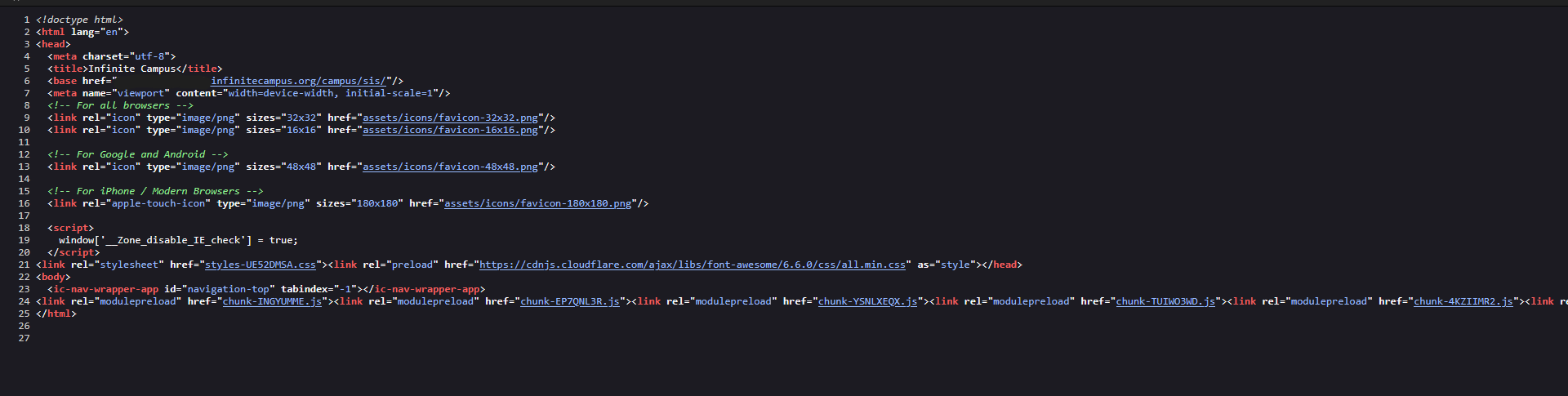
See? Where’s the everything??
BUTT! I immediately noticed that if the code for the tool isn’t in the page source, it has to be viewable on the page somewhere else, and wouldn’t you know it, the tool is an imbedded frame on the web platform that you can view the source of independently. A couple of clicks and we’re looking at 1583 lines of “one less boring thing for me to do for the rest of the year” Firstly, I’d have to write a function that searches for a serial number before making any edits. Luckily, very early on in the source we can see this:
Which tells us exactly the inputs our code needs to give and then in
We see that it also has to trigger the validateInput() to return the “validated” variable of True in order to initiate the search. After creating an input box and function for filling in the data, I use
to take the user inputted serial number and simulate a mouse click on the search button. This takes us to the next screen where we would then see the device history. In order to update an assignment, we need to simulate another click on the device row and proceed onto page number three of the process. As a failsafe, I made the script time out when no clickable row appears, since that means the user either mistyped the serial number or the device is unregistered. Either way, there’s nothing to do in the tool in that case. On page three, we do more autofill and simulated clicks in order to confirm the assignment. This (when all is well) will complete one full assignment automatically almost as fast as the pages can load. It has to be almost as fast because sometimes the page loads miliseconds faster than the dropdown items and input boxes. I ran into a minor problem with the script pressing submit without choosing a new assignment status because while it executed the autofill input for assignments, it would press submit faster than the status box would be ready to accept data. This is why there are tiny delays in the auto inputs.
To make it even better, we can add a text box that fills in matching input data so that we can copy and paste multiple assignments at a time to process at once. Previously, we used dropdown and text input boxes to test autofilling. It would take the initial serial number text box data and then proceed to page three to fill in the other cells with the rest of the inputted data. Since we used specific textboxes and dropdowns, that was only viable for singular reassignments. For the spreadsheet textbox idea, we need to decide on a specific format to use. I opted for SERIAL STATUS ID because the serial must be inputted first so it should go first. Status is second because that’s generally always going to be either Reassigned or Lost so I imagine it won’t be hard to do. ID is last for a special reason though. Since there are two types of assignments that could request a different ID type (Student and Location assignment), we need to make a way to have one ID be inputted but have the code sort it and determines to either do a location OR student assignment since on the platform, they share the same input boxes. To be as simple as possible, we can have the code break spreadsheet data into parts with p[x] which will input data into corresponding fields based on our spreadsheet format. In our code, p[0] is for serial numbers, p[1] is for status, and the third part (p[2]) will be the id input. The third part uses “/^\d{4}$/ ” which looks a little crazy, I know. It is a regex that checks if the third part is exactly 4 digits. Since Location assignments take inputs of 4 digit location codes, we can use this operator
to decide if the third part is exactly 4 characters (if so, choose location assignment) or not 4 characters (if so, choose student assignment). It then officially defines the id variable. Here’s the full segment:
Essentially, this segment splits the spreadsheet data into three parts: p[0] for serial number, p[1] for status, and p[2] for student vs location assignment and also inputting the contents of the third part into the proper frame field. The algorithm starts at p[0] which ensures the serial number is properly filled in the search field, then again on the assignment screen. Next, p[1] is skipped temporarily since it’s not needed just yet. The line
let id = p[2]?.trim();
attempts to decide whether or not the contents of the third part is a location id or student id based on whether or not the contents are 4 digits long. If it is four digits, it chooses the location assignment type and then inputs the contents of part 3 into the proper frame field. if it isn't 4 digits, it does the same but for student type field. THEN p[1] is entered since that's the last thing to do in the reassignment frame. Then we have it submit the data on screen three with another simulated click then we are DONEZO!
This, combined with some silly logging that also lists any skipped assignments for manual viewing, means that I can go from 60-120 assignments per hour (spending about 30-60 seconds per assignment without the script) to around 720 assignments per hour since the script can complete an assignment in about 5 seconds if there are no errors leading to timeouts or popups requiring human input. Mathematically, that’s a whopping 500% to 1100% increase in productivity… Holy shit…
TECHNICALLY this means that while using this script I can play games on my computer for one full hour while the script does its thing and I’ll be 5x-11x times more productive than the next guy. You can’t ask for a better deal than that.
Kthnxbye!